Turn a grocery receipt into a pantry list
A receipt tells you what the store rang up. When you put the bags away, you can also see what arrived, how much you can use and where you’re going to keep it.
See a receipt line by line
Check the groceries as you put them away
Open the receipt
In Pantry, tap Review a receipt. Choose a receipt photo or PDF, or type or paste the printed lines. Check the store and purchase date. Keep the receipt nearby if an abbreviation is hard to read.
Pick the food that came home
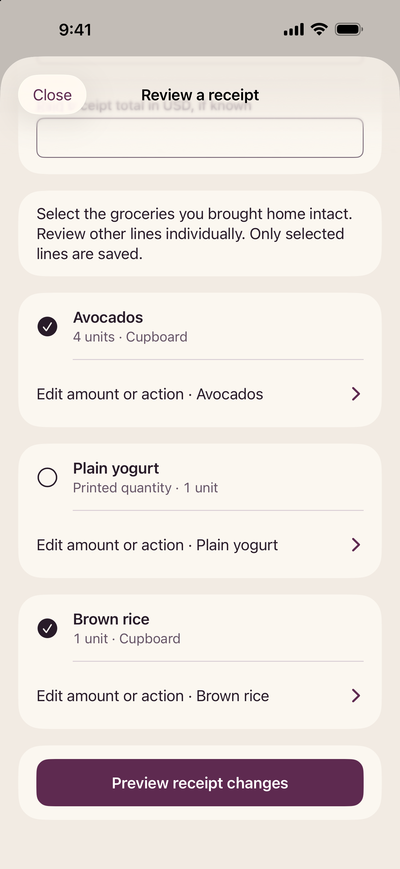
Read down the receipt alongside the groceries. Select the food you want to add. Skip bag fees and deposits. If you can’t tell what an abbreviation means, leave that line out until you can check the package.
Check both quantities
Open a line to review the amount received, the amount you can use, the unit and the storage location. A pack of four avocados can mean four received but only three available if one was already eaten. Enter a paid line total only when you can confirm the full amount for that item.
Preview before you save
Review the selected changes, then confirm them. Open Pantry to check the food in its storage location. Open Receipt history if you want to look back at the original printed wording.
Three receipt lines, three decisions
Imagine these lines on the same receipt. The counts describe what you found while unpacking.
| Printed line | What you found | Pantry entry |
|---|---|---|
| Avocados · 4 | One already eaten | 3 available |
| Lentils · 2 bags | Both bags in the cupboard | 2 bags |
| Bag fee | A charge for carrying bags | Skip |
A printed price per pound or kilogram is a unit price. If the receipt has no final charge for that line, leave the paid line total blank. You can still record the confirmed food quantity.